Get in touch
Clears your inbox, sends emails, manages your calendar, checks you in for flights.
All from WhatsApp, Telegram, or any chat app you already use.
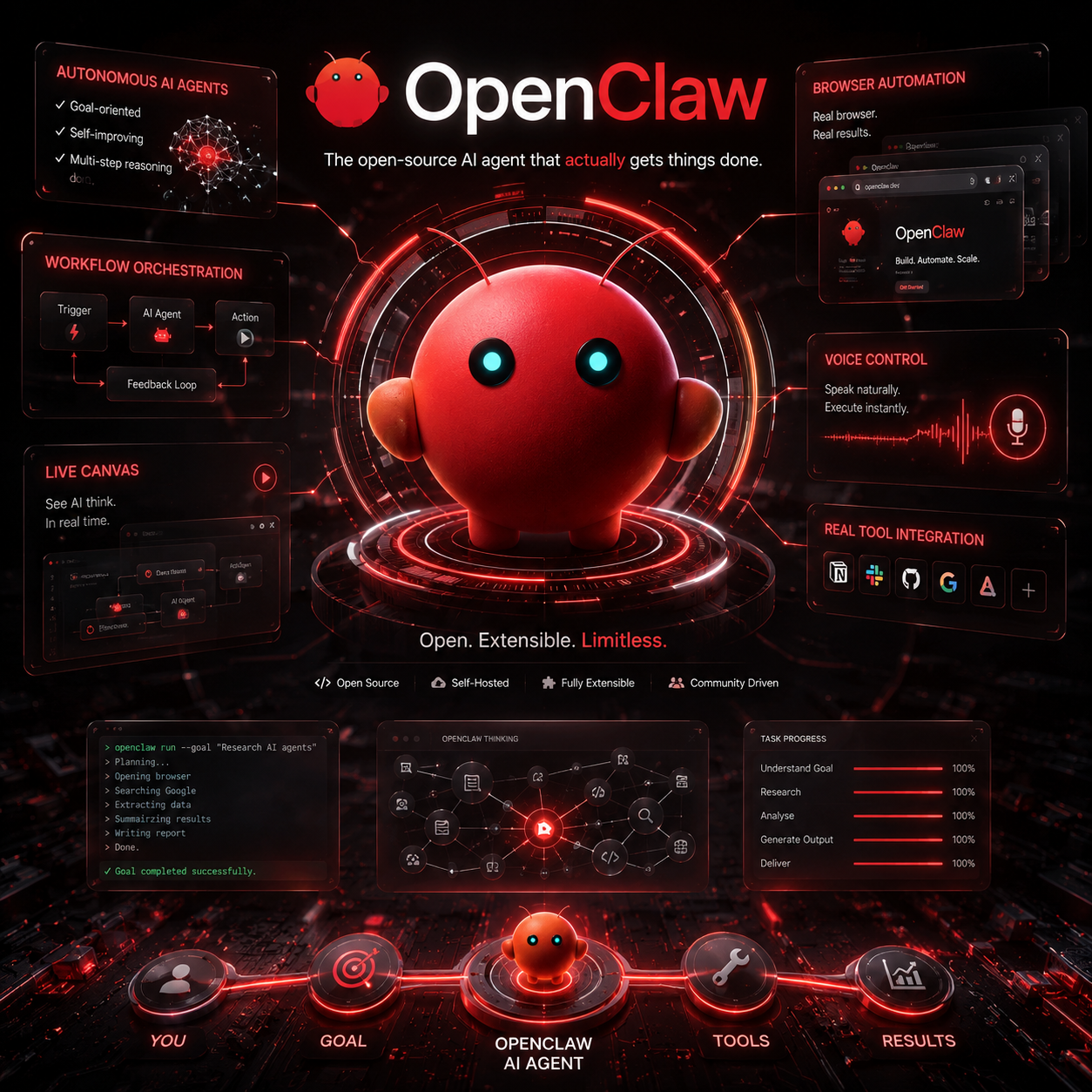
Artificial Intelligence is rapidly evolving beyond simple chat interfaces and text generation. We are entering a new era where AI systems are no longer limited to answering questions, but are becoming capable of taking real actions, controlling software, automating workflows, and operating like autonomous digital workers. At the center of this transformation stands OpenClaw — one of the most exciting and powerful open-source AI agent platforms currently emerging in the AI ecosystem.
Unlike traditional AI assistants that stop after generating a response, OpenClaw is designed to execute tasks in real environments. It combines the reasoning power of modern large language models with the ability to interact with browsers, applications, APIs, workflows, external tools, and even operating systems. The result is something that feels less like a chatbot and more like an intelligent autonomous operator capable of performing complex actions with minimal human intervention.
OpenClaw represents a major shift in how we think about artificial intelligence. Instead of asking AI for instructions on how to complete a task, users can now ask the AI to perform the task itself. This distinction is extremely important because it moves AI from passive assistance into active execution. In many ways, OpenClaw feels like the early foundation of what future AI operating systems and AI employees may eventually become.
One of the most impressive aspects of OpenClaw is its ability to control a real web browser. This means the AI agent can navigate websites, click buttons, type into forms, search for information, collect data, manage dashboards, and automate repetitive online workflows. Rather than relying solely on APIs, OpenClaw can operate visually and contextually within actual websites much like a human user would. This opens the door to endless automation possibilities, including research tasks, lead generation, analytics collection, content publishing, CRM management, and business process automation.
The architecture behind OpenClaw is built around the idea of autonomous AI agents. These agents are capable of planning tasks, breaking large objectives into smaller steps, executing those steps, observing the results, correcting mistakes, and continuing the workflow until the final objective is completed. This multi-step reasoning and execution process is what separates advanced AI agents from ordinary AI assistants. OpenClaw does not simply generate text responses; it continuously operates toward achieving real outcomes.
A particularly fascinating feature of OpenClaw is its extensibility system based on modular “skills.” Skills function similarly to plugins or capability packages that teach the AI how to interact with specific services, applications, APIs, or workflows. Developers can create custom skills that allow OpenClaw to integrate with platforms such as GitHub, Slack, Notion, Discord, cloud services, databases, automation frameworks, and internal business systems. This modular ecosystem transforms OpenClaw into a highly customizable AI infrastructure platform capable of adapting to virtually any workflow imaginable.
The project also emphasizes transparency and visibility during execution. OpenClaw can display live reasoning chains, execution graphs, workflow stages, and active tool usage in real time. Users are able to observe how the AI thinks, which tools it selects, how it approaches problems, and what actions it is currently performing. This live execution visibility creates a level of trust and understanding that is often missing in traditional black-box AI systems.
One of the reasons OpenClaw has attracted significant attention is because it aligns perfectly with the future direction of AI development. The AI industry is rapidly moving toward autonomous systems capable of performing complete workflows rather than isolated tasks. Companies are increasingly interested in AI employees, autonomous operators, workflow orchestration systems, and persistent digital agents. OpenClaw appears to be positioning itself directly within this emerging category, acting as a bridge between conversational AI and fully autonomous execution environments.
Installation and deployment are surprisingly accessible considering the complexity of the platform. OpenClaw can typically be installed through GitHub using Node.js and standard package managers. Developers usually begin by cloning the repository, installing dependencies, configuring API keys for supported language models such as OpenAI or Anthropic, and then launching the local environment. Docker support is also available, allowing for easier deployment across servers, VPS infrastructures, and containerized environments. This flexibility makes OpenClaw suitable for both hobbyist experimentation and enterprise-scale deployments.
Another major advantage of OpenClaw is its strong focus on self-hosting and privacy. Unlike many commercial AI platforms that rely entirely on cloud-based infrastructure, OpenClaw can be deployed locally on personal hardware or private servers. This gives users complete control over their data, workflows, credentials, and execution environments. For businesses concerned about security, privacy, or compliance, this level of ownership is extremely valuable. Developers can run OpenClaw on anything from compact mini PCs and Raspberry Pi devices to dedicated GPU workstations and enterprise Kubernetes clusters.
The potential use cases for OpenClaw are enormous. In business environments, it can automate customer support operations, lead research, reporting systems, CRM management, analytics collection, and repetitive administrative work. For developers, it can assist with repository management, deployment pipelines, debugging, testing, and infrastructure automation. In marketing, it can automate SEO research, content workflows, competitor analysis, and campaign management. Researchers can use it for large-scale web extraction, summarization, and data aggregation tasks. Essentially, OpenClaw acts as a universal AI automation layer capable of interacting with both digital tools and human workflows.
However, the power of OpenClaw also introduces serious considerations around security and safety. Because the platform can interact with browsers, filesystems, APIs, and automation tools, improper configurations or malicious skills could potentially create vulnerabilities. This is why sandboxing, permission control, isolated execution environments, and careful validation of extensions are critical when deploying advanced autonomous agents. The same capabilities that make OpenClaw revolutionary also require responsible deployment practices.
The broader ecosystem surrounding OpenClaw is evolving rapidly. Communities are already building repositories of reusable skills, workflow templates, orchestration systems, and deployment tools. Tutorials, integrations, extensions, and automation packs are continuously expanding the platform’s capabilities. As adoption grows, OpenClaw may eventually become one of the foundational infrastructures for the next generation of AI-native applications and autonomous systems.
What makes OpenClaw truly exciting is not simply what it can do today, but what it represents for the future. It symbolizes the transition from AI as a conversational assistant into AI as an autonomous executor. This transition may fundamentally reshape how individuals, startups, and enterprises interact with software, productivity, automation, and digital labor. The idea of AI systems capable of independently managing tasks, coordinating workflows, and operating across digital environments is no longer science fiction — platforms like OpenClaw are already making it real.
In many ways, OpenClaw feels like one of the earliest glimpses into a future where AI agents become persistent digital collaborators integrated into everyday life and business operations. It is not merely another AI project or temporary trend. It is part of a much larger technological movement toward autonomous intelligence, executable AI systems, and fully interactive digital agents that can think, plan, act, and adapt in real environments.
The future of AI is no longer just about generating answers. The future is about generating action. And OpenClaw is helping define what that future looks like.
OpenClaw is designed as a modular autonomous AI agent framework that combines large language models with orchestration systems, browser automation, tool execution layers, memory management, and extensible runtime capabilities. At its core, OpenClaw operates as an execution engine that transforms natural language instructions into actionable workflows performed by autonomous agents.
The platform typically consists of several major layers working together simultaneously. The first layer is the reasoning engine powered by large language models such as GPT-4, Claude, DeepSeek, or local LLMs. This reasoning layer interprets user objectives, decomposes tasks into execution steps, and determines which tools or skills are required to complete the workflow.
The second layer is the orchestration runtime. This runtime manages execution pipelines, state handling, task queues, memory persistence, tool chaining, retries, validation logic, and multi-step agent planning. The orchestration layer essentially acts as the AI agent operating system responsible for coordinating all execution processes.
The third layer is the tools and skills ecosystem. Skills provide modular capabilities that extend the platform with integrations, browser operations, API access, shell execution, cloud orchestration, scraping engines, messaging systems, and external services. This architecture allows OpenClaw to evolve dynamically without modifying the core runtime.
The final layer consists of frontend visualization systems, live execution canvases, telemetry pipelines, logs, and monitoring systems that allow developers to observe and debug autonomous agent behavior in real time.
Before deploying OpenClaw, several dependencies are generally required depending on the deployment mode.
For local development environments, the recommended setup includes:
For production deployments, recommended infrastructure includes:
The installation process usually begins with cloning the official repository.
git clone https://github.com/openclaw/openclaw.git

cd openclaw
For enterprise environments or staging deployments, engineers often fork the repository and create isolated development branches for custom skills, orchestration modifications, or internal integrations.
After cloning the repository, install all required dependencies.
Using npm:
npm install
Or using pnpm for better performance:
pnpm install
During this phase, OpenClaw installs:
The platform heavily relies on environment variables for runtime configuration.
A typical .env file may include:
OPENAI_API_KEY=
ANTHROPIC_API_KEY=

MODEL_PROVIDER=openai
DEFAULT_MODEL=gpt-4o

DATABASE_URL=postgresql://user:password@localhost/openclaw

REDIS_URL=redis://localhost:6379

ENABLE_BROWSER_AUTOMATION=true

PLAYWRIGHT_HEADLESS=false

LOG_LEVEL=debug

AGENT_MEMORY=true
Engineers typically separate environments into:
Sensitive credentials should always be stored using:
For local development:
npm run dev
Or with pnpm:
pnpm dev
This usually launches:
By default, the local dashboard runs on:
http://localhost:3000
Production environments commonly use Dockerized deployments.
Basic startup:
docker compose up
Detached production mode:
docker compose up -d
Docker orchestration typically includes:
Advantages of Docker deployment include:
One of OpenClaw’s most advanced engineering components is the browser execution layer.
Most implementations rely on:
The AI agent can:
Example browser execution pipeline:
User Goal
   ↓
Reasoning Engine
   ↓
Browser Planner
   ↓
DOM Analysis
   ↓
Action Executor
   ↓
Validation Layer
   ↓
Feedback Loop
This architecture enables autonomous browser operations similar to human interaction.
The OpenClaw skills ecosystem is arguably its most important engineering feature.
Skills are modular runtime extensions that define:
A skill usually contains:
Example structure:
skills/
 ├── github/
 │    ├── manifest.json
 │    ├── actions.ts
 │    ├── prompts/
 │    └── schemas/
Skills can expose functions like:
Developers can build proprietary OpenClaw skills for internal workflows.
Example:
export async function createInvoice(data) {
   const response = await accountingAPI.create(data)

   return response
}
Skills can integrate:
This makes OpenClaw extremely adaptable for enterprise automation.
OpenClaw supports collaborative agent systems.
Typical architecture:
Coordinator Agent
 ├── Research Agent
 ├── Execution Agent
 ├── Validation Agent
 └── Reporting Agent
This separation allows:
Multi-agent systems are especially useful for:
Modern OpenClaw deployments frequently implement:
Memory infrastructure may use:
This allows agents to:
One of the most valuable engineering features is observability.
OpenClaw exposes:
This creates a transparent debugging environment for autonomous AI execution.
Developers can inspect:
Because OpenClaw can execute real-world actions, security is critical.
Recommended practices include:
Enterprise deployments often isolate:
Never expose unrestricted shell access directly to autonomous agents.
Updates are usually performed through Git synchronization.
git pull origin main
Then rebuild dependencies:
pnpm install
And restart containers:
docker compose down
docker compose up -d --build
Production systems should always use:
For large-scale deployments, engineers commonly use:
Scaling considerations include:
Advanced deployments may separate:
OpenClaw can integrate with:
This enables:
Example local model configuration:
MODEL_PROVIDER=ollama

OLLAMA_HOST=http://localhost:11434

DEFAULT_MODEL=llama3
From an engineering perspective, OpenClaw can become:
It effectively acts as a programmable autonomous execution framework powered by language models.
OpenClaw is not simply another AI wrapper or chatbot interface. From a systems engineering perspective, it is evolving into a distributed autonomous execution platform capable of orchestrating reasoning engines, browser automation, memory systems, workflows, APIs, and external tools into a unified AI operating environment.
What makes OpenClaw technically significant is the convergence of multiple disciplines:
The industry is clearly moving toward autonomous AI infrastructure, and OpenClaw represents one of the most compelling open-source implementations of that vision today.
Your email address will not be published. Required fields are marked *
Cookie preferences